
I HATE WINDOWS 7!! !! !! !



 30 Dec 2011, 4:46 pm

finally someone makes a valid point, and i agree completely. most hackers that go into steal stuff though will go with easy if they don't know much about hacking, but pros go after the complex stuff.
i don't know what a command line is but windows clearly lacks it as i still have trouble orgainzing stuff on mine, mac can organize like a pro right off the shelf, with windows you have to pump a ton of money into it to get half that.
From Windows, start menu>run>cmd
or start menu >search programs and files > type in 'cmd'
Instant DOS shell/command line.
so windows is better for general computer use, games, and entertainment, video, music.
macs are better for sensitive info and stuff you can't afford to lose, which means my dad should have a mac, he does all his banking, credit card stuff, taxes etc... on his windows xp. but he is no computer expert by any means.
I think you're generalizing too much, it's not so black and white. Windows, Macintosh, Linux, and BSD can all be fantastic desktops, workstations, servers, and gaming platforms. You just need to find what fits your workflow/lifestyle/preference and work within those constraints! For example, while Windows and Macintosh both offer more 'mature' and packaged audio production solutions, you can achieve the same results in Linux if you know what types of tools you need and you know who to ask. Why I use Linux? Partly because I feel supporting open source software is the right thing to do, partly because I enjoy having so much great software to choose from and contribute too!
 30 Dec 2011, 7:03 pm
Most Linuxen default to bash (although *buntu uses dash which has just enough differences to be annoying) but Linux, along with *bsd, has or can easily have installed csh, jsh, ksh, rc, rsh, sh, tcsh, zsh, etc etc
The big thing I remember reading is that you can scroll back much further and it remembers more than what is just on the virtual console your using. In linux, if I have output scrolling on both vt2 and vt3, it will only remember the console that is currently on my screen. So if I'm on vt2 and switch to vt3, I won't be able to scroll back and see what happend. I'm sure I can get most of the functionality from remembering to run screen, but that program drives me nuts with all the random key combinations. I believe they also have more fonts available.
 Not to mention the console in linux is very slow, text scrolling by presents a serious lag on your system when compiling. I wasn't thinking of the shell, I know I can get any shell for linux I want.
_________________
Open Source is capitalism applied to IP.


 30 Dec 2011, 9:06 pm
finally someone makes a valid point, and i agree completely. most hackers that go into steal stuff though will go with easy if they don't know much about hacking, but pros go after the complex stuff.
i don't know what a command line is but windows clearly lacks it as i still have trouble orgainzing stuff on mine, mac can organize like a pro right off the shelf, with windows you have to pump a ton of money into it to get half that.
From Windows, start menu>run>cmd
or start menu >search programs and files > type in 'cmd'
Instant DOS shell/command line.
so windows is better for general computer use, games, and entertainment, video, music.
macs are better for sensitive info and stuff you can't afford to lose, which means my dad should have a mac, he does all his banking, credit card stuff, taxes etc... on his windows xp. but he is no computer expert by any means.
I think you're generalizing too much, it's not so black and white. Windows, Macintosh, Linux, and BSD can all be fantastic desktops, workstations, servers, and gaming platforms. You just need to find what fits your workflow/lifestyle/preference and work within those constraints! For example, while Windows and Macintosh both offer more 'mature' and packaged audio production solutions, you can achieve the same results in Linux if you know what types of tools you need and you know who to ask. Why I use Linux? Partly because I feel supporting open source software is the right thing to do, partly because I enjoy having so much great software to choose from and contribute too!
ok dos, i can't use that at all.
yeah i probably am, really was just pointing out the major differences. really you just need to get the computer you feel most comfortable on. like i hated vista and once i got 7 it seemed to me like vista was the beta os. vista had a few good features that i felt needed some tweaking. 7 at it's base is almost everything i ever wanted. slideshow background, taskbar\dock combo. and better compatiblity then vista had. but would it kill them to let animated gifs animate for god sake.
i had to get infran viewer to see my animated gifs run right. there are a few other things but that was the one i hated the most. it's not perfect but it has almost everything i ever wanted. slideshow desktop is my top fav. i like to change my background all the time so now i can set up my pc to do it automatically. and i can have different categories and everything. it also can shuffle the images as well. so it doesn't get repetitive.
but yeah compys are like games you have to find the one you like.
_________________
"It's the song of destruction a requiem of the end" jr in xenosaga III


 31 Dec 2011, 6:36 pm
Ubuntu is good for non-techie people, 40djbrooks. I hope you like it.
i never used it myself so i have no clue what it can do, or what a command line generally is. i know what an emulator does, or at least the console ones, got one for ps2 n64, super nintendo, nintendo, gameboy, ds. but the command line is most likely different then those.
_________________
"It's the song of destruction a requiem of the end" jr in xenosaga III
 31 Dec 2011, 7:09 pm
Simple enough. A "command line" is a command, on a line. You run a program which looks at what you type in, on a line, and interprets that text as a command (often).
Some really old stuff (like the windows CMD program) does very little beyond that. The first "word" on a line is another program, to be run. The remainder of the line is passed to that program, to tell it what to do. When that program ends, the "shell" reads another line from you.
At the other end of the spectrum, the *nix "bash" shell allows you to write extremely complex programs. However, it still allows you to type a program name and stuff to be sent to that program, on a single line.
Where the approaches differ is that Microsoft doesn't really want you to be able to do anything much from the command line they supply. They'd much rather that you paid them for some GUI program that does things just not available from the command line.
With *nix, almost all GUI programs regularly do their nitty-gritty work by invoking programs that you can directly drive from the command line. This means you can have GUI interfaces that do the most common things you want to do, really easily. However, if you come up with a requirement which is not handled by any GUI program, you can simply drive the underlying command line program yourself.
E.g. I like to keep my machines pretty up-to-date. If I use any of the GUIs to do this, it takes several mouse clicks to complete. I just get lazy, these days, and hit it with the command line:
That either does nothing at all, if there are no updates... or it stops, waiting for me to OK (with "Enter") the updates - which I briefly read, just out of interest to see what's being updated.
(Note that I don't actually type the line above. I just hit up-arrow one or more times to get back to it... or maybe do "!apt".)
_________________
"Striking up conversations with strangers is an autistic person's version of extreme sports." Kamran Nazeer
31 Dec 2011, 7:32 pm
Simple enough. A "command line" is a command, on a line. You run a program which looks at what you type in, on a line, and interprets that text as a command (often).
Some really old stuff (like the windows CMD program) does very little beyond that. The first "word" on a line is another program, to be run. The remainder of the line is passed to that program, to tell it what to do. When that program ends, the "shell" reads another line from you.
At the other end of the spectrum, the *nix "bash" shell allows you to write extremely complex programs. However, it still allows you to type a program name and stuff to be sent to that program, on a single line.
Where the approaches differ is that Microsoft doesn't really want you to be able to do anything much from the command line they supply. They'd much rather that you paid them for some GUI program that does things just not available from the command line.
With *nix, almost all GUI programs regularly do their nitty-gritty work by invoking programs that you can directly drive from the command line. This means you can have GUI interfaces that do the most common things you want to do, really easily. However, if you come up with a requirement which is not handled by any GUI program, you can simply drive the underlying command line program yourself.
E.g. I like to keep my machines pretty up-to-date. If I use any of the GUIs to do this, it takes several mouse clicks to complete. I just get lazy, these days, and hit it with the command line:
That either does nothing at all, if there are no updates... or it stops, waiting for me to OK (with "Enter") the updates - which I briefly read, just out of interest to see what's being updated.
(Note that I don't actually type the line above. I just hit up-arrow one or more times to get back to it... or maybe do "!apt".)
ok lol that is way beyond what i can understand, i can run windows and i bit more then that, but that kind of computer stuff i don't understand at all.
i think i'll just be content with what i can do.
i feel like i'm an idiot now, i don't scripting of any kind. ^^; but at least i'm now more happy with what i got now.
_________________
"It's the song of destruction a requiem of the end" jr in xenosaga III
31 Dec 2011, 8:45 pm
ok lol that is way beyond what i can understand, i can run windows and i bit more then that, but that kind of computer stuff i don't understand at all.
i think i'll just be content with what i can do.
i feel like i'm an idiot now, i don't scripting of any kind. ^^; but at least i'm now more happy with what i got now.
Actually, the fact that you asked the question (sort of) means that you can understand the answer. Some of the most enthusiastic scripters come from precisely where you are - they didn't know what they could do, then found out, then went on to enjoy the power!.
_________________
"Striking up conversations with strangers is an autistic person's version of extreme sports." Kamran Nazeer
31 Dec 2011, 10:45 pm
ok lol that is way beyond what i can understand, i can run windows and i bit more then that, but that kind of computer stuff i don't understand at all.
i think i'll just be content with what i can do.
i feel like i'm an idiot now, i don't scripting of any kind. ^^; but at least i'm now more happy with what i got now.
Actually, the fact that you asked the question (sort of) means that you can understand the answer. Some of the most enthusiastic scripters come from precisely where you are - they didn't know what they could do, then found out, then went on to enjoy the power!.
i didn't know that, really i didn't. but it makes sense alot of modders on the nexus who made something really good were ones that made the mod because they could find anyone else who would make it.
i mean that is a game but same basic idea.
i've always wanted to learn it, and even though when i try i am overwhelmed quite a bit, i still would like to learn, i guess it's a dream i have that won't die, all of my others did but not this one. it could also be obsession or something screwed up in my head. but if feels good to think i might have some hope maybe.
_________________
"It's the song of destruction a requiem of the end" jr in xenosaga III
 31 Dec 2011, 11:46 pm
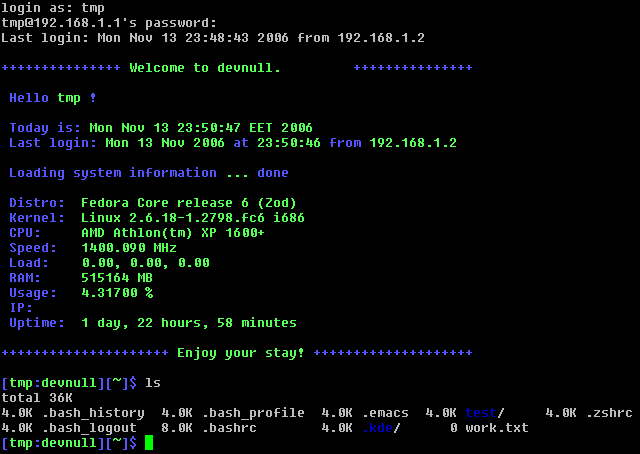
A command line will probably make more sense if you see it. Here is an example of a session on a Linux command line. In this session someone just logged in, at which point the system gave a lot of information about the user's last login, OS specifications and the like. The user asked for a list of the files and directories available from their home directory. This isn't the sort of thing that you'd normally use a terminal for because it can be just as easy or easier to do it graphically. But there is some stuff that is easier to do from the command line, like accessing restricted files or changing the permissions on them (which is actually a more mundane example).
01 Jan 2012, 2:25 am
wow that is a very detailed description of his computer specs, dang. i never even knew this command line was on the computer until it was mentioned here.
i always thought that windows or an os really bypassed dos completely to where there is no use for it. i find it cool that the base line an os is built on can still override the very thing it is running.
i'm really amazed, very cool. it seems i have alot more to learn about these machines.
_________________
"It's the song of destruction a requiem of the end" jr in xenosaga III
01 Jan 2012, 12:15 pm
i always thought that windows or an os really bypassed dos completely to where there is no use for it. i find it cool that the base line an os is built on can still override the very thing it is running.
i'm really amazed, very cool. it seems i have alot more to learn about these machines.
Well, your assumption may be correct with Windows (I'm not sure). But on Linux, the graphical interface is really just built over top of the command line. The computer knows that when you press a button it should do something on the command line. The power of Linux is that you can operate from the command line directly, which can give more control and capabilities not otherwise available.
01 Jan 2012, 3:07 pm
i always thought that windows or an os really bypassed dos completely to where there is no use for it. i find it cool that the base line an os is built on can still override the very thing it is running.
i'm really amazed, very cool. it seems i have alot more to learn about these machines.
Well, your assumption may be correct with Windows (I'm not sure). But on Linux, the graphical interface is really just built over top of the command line. The computer knows that when you press a button it should do something on the command line. The power of Linux is that you can operate from the command line directly, which can give more control and capabilities not otherwise available.
actually that's just what i always believed, that any os competely bypassed dos. but now i see that an os is like a program itself running off of dos. interesting.
i'm amazed that windows and other oses that display an image you can see from a bunch of lines in dos. wow i have no idea how that works but it's amazing when you think about it. games are made in roughly the same way, if you dump a game all you get is code but yet when you play the game you see it as a 3d world. so both an os and a game are like a work of art.
i think i'm learning more about computers here then i ever did in school.
_________________
"It's the song of destruction a requiem of the end" jr in xenosaga III
01 Jan 2012, 11:08 pm
Just a minor point... OS and DOS.
OS = Operating System.
DOS = Disk Operating System.
MSDOS = Microsoft Silly Disk Operating System. (OK. A joke.)
TOS = Tape Operating System (that was quite a beast - an OS that ran from magnetic tape!)
RTOS - Real Time Operating System.
(... plus endless variants of all of these things.)
(Not to be confused with BIOS = Basic Input Output System)
Anyway, the operating system is roughly the program(s) that run on your machine, in order to provide an environment where application programs can do the "real" work, without concerning themselves too much with the specific hardware and so on.
_________________
"Striking up conversations with strangers is an autistic person's version of extreme sports." Kamran Nazeer
| Similar Topics | |
|---|---|
| Windows 11 26H2 is the next big update |
07 Jul 2026, 5:36 am |
| Windows 10 Extended Security Updates for an extra year |
07 Jul 2026, 5:23 pm |


