Page 1 of 1 [ 10 posts ] 

CerebralDreamer
Veteran
Veteran

User avatar

Joined: 22 Dec 2008
Gender: Male
Posts: 516

16 Mar 2010, 12:09 pm

I've been wanting to put all my math notes on computer, since then I wouldn't have to worry about losing pages, or having to copy anything by hand. I keep running up against the same problem. Writing out math on computer is as far from user friendly as the normal person could imagine. Open Office and Microsoft Office both do a really poor job at this.

I was wondering if someone knew of a free program, where a lot of this pain was taken out. I'm looking for something that will allow printing, so I can make use of my notes later on. (And not have to worry about spilled drinks, lost pages, or my cat running dirty paws across the page.)

Sizing of the text should also be pretty easy to manipulate. I also need to be able to insert comments about the occasional formula or step. Without comments, the entire thing is pretty useless.

I just hope I'm not asking for the Lost Ark or the Holy Grail in this post. :lol:


Obres
Veteran
Veteran

User avatar

Joined: 13 Jul 2007
Age: 45
Gender: Male
Posts: 1,423
Location: NYC

16 Mar 2010, 1:38 pm

LaTeX is pretty popular for publishing math papers, though it'll take some learning and it can also be difficult to get it running.


Orwell
Veteran
Veteran

User avatar

Joined: 8 Aug 2007
Age: 36
Gender: Male
Posts: 12,518
Location: Room 101

16 Mar 2010, 1:58 pm

You have to use LaTeX, but it can be made easier with a nice front-end. I like LyX.


_________________
WAR IS PEACE
FREEDOM IS SLAVERY
IGNORANCE IS STRENGTH


StuartN
Veteran
Veteran

User avatar

Joined: 20 Jan 2010
Age: 62
Gender: Male
Posts: 1,569

16 Mar 2010, 4:33 pm

The Math component of OpenOffice http://www.openoffice.org/product/math.html is platform independent and very easy to use. You do have to switch between editing the text document and the math document, but it works well and prints well.

If you want live mathematics (with graphing, equation solving and calculus) then one of Maxima http://maxima.sourceforge.net/, Octave http://www.gnu.org/software/octave/, FreeMat http://www.gnu.org/software/octave/ or SciLab http://www.scilab.org/products/scilab/features might work for you.

R http://www.r-project.org/ because is good for stats and graphing.


justMax
Veteran
Veteran

User avatar

Joined: 23 Nov 2009
Age: 45
Gender: Male
Posts: 539

16 Mar 2010, 4:52 pm

http://www.wolframalpha.com/

It's one of my favorite ones.

I'd either use that, or simply arrange stuff in mspaint using character map for symbols and such.


lau
Veteran
Veteran

User avatar

Joined: 17 Jun 2006
Age: 77
Gender: Male
Posts: 9,798
Location: Somerset UK

16 Mar 2010, 8:22 pm

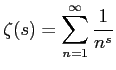
Image
(LaTeX - inside LaEqEd image)
http://www.thrysoee.dk/laeqed/


_________________
"Striking up conversations with strangers is an autistic person's version of extreme sports." Kamran Nazeer


CerebralDreamer
Veteran
Veteran

User avatar

Joined: 22 Dec 2008
Gender: Male
Posts: 516

16 Mar 2010, 8:50 pm

justMax wrote:
http://www.wolframalpha.com/

It's one of my favorite ones.

I'd either use that, or simply arrange stuff in mspaint using character map for symbols and such.

That seems to be closest to what I'm looking for. The PDF data doesn't convert to OpenOffice with any real success, but I'm sure I could get a PDF editor, and simply do things in there.

That's really what I'm looking for anyways. I don't want to make custom equations. I just want to get all the common Calculus and Differential Equations formulas in a readily accessible, readily organized format. Being able to copy-paste will make things a lot easier.

Thanks!

Unless someone knows a good cheap/free PDF editor, I think this thread can be closed. (Or simply allowed to die.)



StuartN
Veteran
Veteran

User avatar

Joined: 20 Jan 2010
Age: 62
Gender: Male
Posts: 1,569

17 Mar 2010, 5:36 am

CerebralDreamer wrote:
Unless someone knows a good cheap/free PDF editor, I think this thread can be closed. (Or simply allowed to die.)


You could try the PDF import plugin http://extensions.services.openoffice.o ... /pdfimport in OpenOffice to see how well it works with the documents you use.

I suspect the equations in most PDF files will have been rendered into bitmaps, like the image of an equation that Lau has posted above, so they can not be edited. A math program or LaTex or OpenOffice Math store the equation as editable text and render to PDF or print.


lau
Veteran
Veteran

User avatar

Joined: 17 Jun 2006
Age: 77
Gender: Male
Posts: 9,798
Location: Somerset UK

17 Mar 2010, 6:09 am

StuartN wrote:
CerebralDreamer wrote:
Unless someone knows a good cheap/free PDF editor, I think this thread can be closed. (Or simply allowed to die.)


You could try the PDF import plugin http://extensions.services.openoffice.o ... /pdfimport in OpenOffice to see how well it works with the documents you use.

I suspect the equations in most PDF files will have been rendered into bitmaps, like the image of an equation that Lau has posted above, so they can not be edited. A math program or LaTex or OpenOffice Math store the equation as editable text and render to PDF or print.

The image I posted contains the LaTeX used to generate it. That's the beauty of LaEqEd - you get to eat your cake and still have it.


_________________
"Striking up conversations with strangers is an autistic person's version of extreme sports." Kamran Nazeer


StuartN
Veteran
Veteran

User avatar

Joined: 20 Jan 2010
Age: 62
Gender: Male
Posts: 1,569

17 Mar 2010, 7:46 am

lau wrote:
The image I posted contains the LaTeX used to generate it. That's the beauty of LaEqEd - you get to eat your cake and still have it.


I did not realise that, and I am now thoroughly impressed! The LaTex equation text is included as an editable meta tag inside the .PNG graphics file, so you can edit and re-render the image. That is cool.

What program(s) would you suggest to collect and work with documents containing equations? I suppose that you could use Laeqed and embed the .PNG files in any document editor, but that seems a bit disintegrated. I am thinking more like the Word, Writer or MathCad where double-clicking on an equation opens an in-place equation editor.