Page 39 of 368 [ 5884 posts ]  Go to page Previous  1 ... 36, 37, 38, 39, 40, 41, 42 ... 368  Next

EmeraldGreen
Toucan
Toucan

User avatar

Joined: 31 May 2013
Age: 58
Gender: Female
Posts: 250
Location: On a flight of fancy

06 Aug 2015, 8:46 pm

Vitamin D

Image


_________________
*Have Aspergers but undiagnosed
"Seems I'm not alone at being alone"
-The Police
https://www.youtube.com/watch?v=MbXWrmQW-OE


Amity
Veteran
Veteran

User avatar

Joined: 22 Mar 2014
Gender: Female
Posts: 7,714
Location: Meandering

07 Aug 2015, 4:06 am

Wilderness
Image


Britte
Veteran
Veteran

Joined: 23 Nov 2014
Gender: Female
Posts: 8,136
Location: @

07 Aug 2015, 4:19 am

I am wondering how to go about posting a photo. All of the photos in this thread are exquisite.

Yucon


Amity
Veteran
Veteran

User avatar

Joined: 22 Mar 2014
Gender: Female
Posts: 7,714
Location: Meandering

07 Aug 2015, 4:37 am

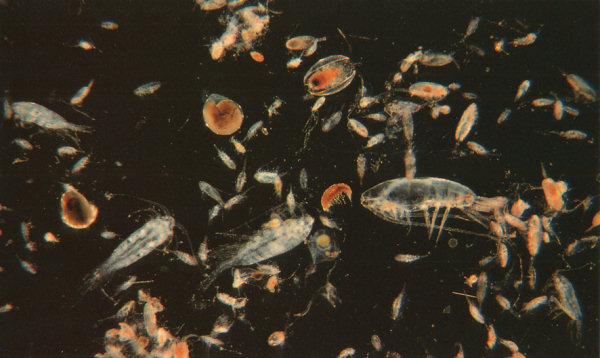
Zooplankton
Image

Quote:
I am wondering how to go about posting a photo.

Click reply as per usual.

The text box that opens has menu options/icons along the top of it: youtube, bold, italic, underline, insert quote, insert link and the last icon is insert image. (a little box with mountains and a sun)

Click it, and a new text box opens, copy the web address of the image you want to use into the text box and click the "Insert into message" option ... and Ta-Da, job done :D .


Krabo
Veteran
Veteran

User avatar

Joined: 5 Nov 2012
Age: 250
Gender: Male
Posts: 15,625
Location: Suomi.

07 Aug 2015, 5:05 am

Aakenustunturi.

Image


_________________
Finn. Male. Older than you. Me and my cat.


Butterfly88
Veteran
Veteran

User avatar

Joined: 22 Jul 2015
Gender: Female
Posts: 21,778
Location: United States

07 Aug 2015, 11:47 am

blueberry bush


Britte
Veteran
Veteran

Joined: 23 Nov 2014
Gender: Female
Posts: 8,136
Location: @

07 Aug 2015, 5:10 pm

Amity wrote:
Click reply as per usual.

The text box that opens has menu options/icons along the top of it: youtube, bold, italic, underline, insert quote, insert link and the last icon is insert image. (a little box with mountains and a sun)

Click it, and a new text box opens, copy the web address of the image you want to use into the text box and click the "Insert into message" option ... and Ta-Da, job done :D .


Thank you, Amity! I can visualize your directions, as I do the same with music videos. I will probably need to start an account on a photo website, based on your directions. I appreciate your reply! : )


Campin_Cat
Veteran
Veteran

User avatar

Joined: 6 May 2014
Age: 64
Gender: Female
Posts: 25,953
Location: Baltimore, Maryland, U.S.A.

08 Aug 2015, 7:22 am

Britte wrote:
Amity wrote:
Click reply as per usual.

The text box that opens has menu options/icons along the top of it: youtube, bold, italic, underline, insert quote, insert link and the last icon is insert image. (a little box with mountains and a sun)

Click it, and a new text box opens, copy the web address of the image you want to use into the text box and click the "Insert into message" option ... and Ta-Da, job done :D .


Thank you, Amity! I can visualize your directions, as I do the same with music videos. I will probably need to start an account on a photo website, based on your directions. I appreciate your reply! : )

No, you don't HAVE TO have an account on a photo website; all you have to do, is: Go to google.com/images, and type in the thing of which you want a picture. When the choices come-up, RIGHT-click on a picture, and open it in a new tab; then, when the picture loads, click on "View Image". Now, all you have to do, is "copy and paste" the address (in the address bar [top of browser]----it'll probably end in something, like: .jpg, or .png, or .gif), into your post, following Amity's directions----OR, copy and paste, highlight it, and click on the mountains / sun icon.

~~~~~~~~~~~~~~~~~

Columbine

Image


_________________
White female; age 59; diagnosed Aspie.
I use caps for emphasis----I'm NOT angry or shouting. I use caps like others use italics, underline, or bold.
"What we know is a drop; what we don't know, is an ocean." (Sir Isaac Newton)


Butterfly88
Veteran
Veteran

User avatar

Joined: 22 Jul 2015
Gender: Female
Posts: 21,778
Location: United States

08 Aug 2015, 9:05 am

dandelion


Amity
Veteran
Veteran

User avatar

Joined: 22 Mar 2014
Gender: Female
Posts: 7,714
Location: Meandering

08 Aug 2015, 7:11 pm

Elfin forest
Image

Campin_cat wrote:
Thank you. :)


Butterfly88
Veteran
Veteran

User avatar

Joined: 22 Jul 2015
Gender: Female
Posts: 21,778
Location: United States

09 Aug 2015, 9:37 am

fern


Britte
Veteran
Veteran

Joined: 23 Nov 2014
Gender: Female
Posts: 8,136
Location: @

09 Aug 2015, 12:41 pm

Campin_Cat wrote:
Britte wrote:
Amity wrote:
Click reply as per usual.

The text box that opens has menu options/icons along the top of it: youtube, bold, italic, underline, insert quote, insert link and the last icon is insert image. (a little box with mountains and a sun)

Click it, and a new text box opens, copy the web address of the image you want to use into the text box and click the "Insert into message" option ... and Ta-Da, job done :D .


Thank you, Amity! I can visualize your directions, as I do the same with music videos. I will probably need to start an account on a photo website, based on your directions. I appreciate your reply! : )

No, you don't HAVE TO have an account on a photo website; all you have to do, is: Go to google.com/images, and type in the thing of which you want a picture. When the choices come-up, RIGHT-click on a picture, and open it in a new tab; then, when the picture loads, click on "View Image". Now, all you have to do, is "copy and paste" the address (in the address bar [top of browser]----it'll probably end in something, like: .jpg, or .png, or .gif), into your post, following Amity's directions----OR, copy and paste, highlight it, and click on the mountains / sun icon.

~~~~~~~~~~~~~~~~~

Columbine

Image


Thank you, Campin' Cat! I appreciate your help. Will give it a go, now :) I wonder about something else...
Is there a way to be notified, when someone quotes a post I've made? I saw the setting for notifications when receiving a PM, but I don't recall seeing this on the notification settings list. Will have another look, though, in case I overlooked it... :flower:

Image


Britte
Veteran
Veteran

Joined: 23 Nov 2014
Gender: Female
Posts: 8,136
Location: @

09 Aug 2015, 12:48 pm

Grass

Image


Amity
Veteran
Veteran

User avatar

Joined: 22 Mar 2014
Gender: Female
Posts: 7,714
Location: Meandering

09 Aug 2015, 4:58 pm

Hatchlings
Image

~~~~~~~~~

Quote:
Is there a way to be notified, when someone quotes a post I've made? I saw the setting for notifications when receiving a PM, but I don't recall seeing this on the notification settings list.

No there isn't, the option underneath the reply text box "Notify me when a reply is posted" is the closest alternative. :)


Butterfly88
Veteran
Veteran

User avatar

Joined: 22 Jul 2015
Gender: Female
Posts: 21,778
Location: United States

09 Aug 2015, 5:57 pm

iceberg


Amity
Veteran
Veteran

User avatar

Joined: 22 Mar 2014
Gender: Female
Posts: 7,714
Location: Meandering

11 Aug 2015, 3:50 am

Jade
Image