Page 1 of 1 [ 10 posts ] 

DeepHour
Veteran
Veteran

User avatar

Joined: 1 Jun 2014
Gender: Male
Posts: 94,386
Location: United Kingdom

13 Sep 2019, 8:45 pm

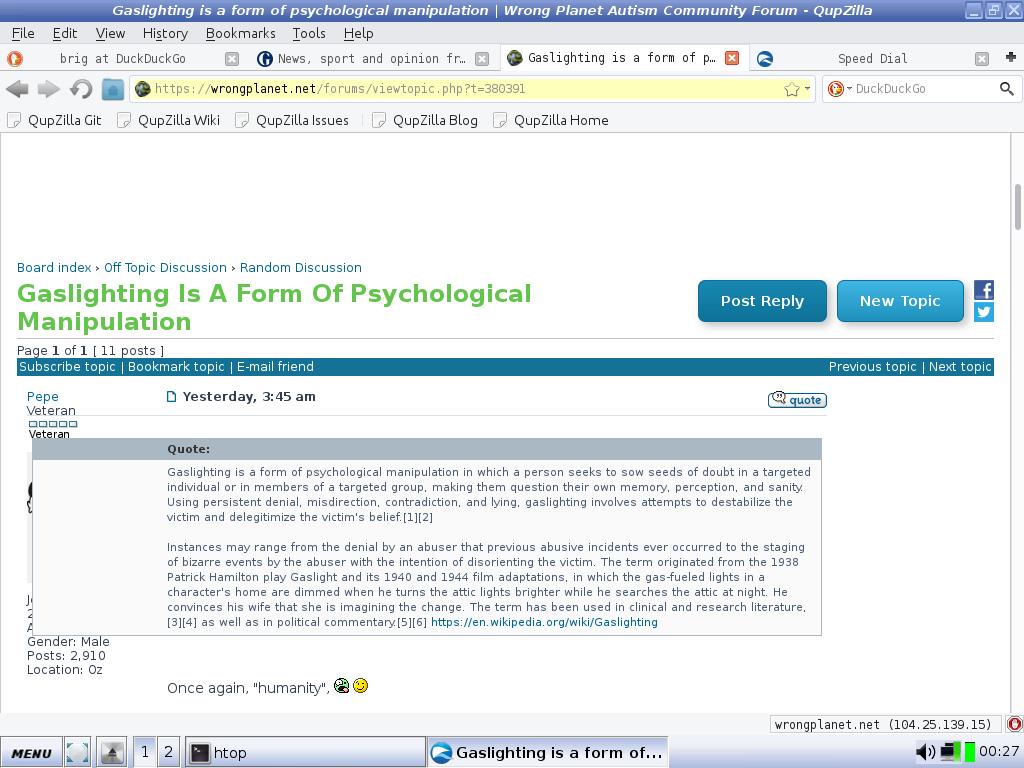
Sometimes when accessing the WP forums on an older computer, I've noticed a strange effect, whereby a quoted post can obscure a large part of the main poster's details (including avatar) on the left-hand side of the window. The screenshot below comes from the Qupzilla browser running in Antix Linux, but I've noticed the same thing in mainstream browsers like Firefox and Chrome in Windows. Anyone else experienced this, or can shed any light upon the cause?


Image


_________________
On a mountain range
I'm Doctor Strange


SaveFerris
Veteran
Veteran

User avatar

Joined: 3 Sep 2016
Gender: Male
Posts: 14,762
Location: UK

13 Sep 2019, 9:33 pm

It's your page size or magnification, make the page size smaller unless like me you need it that size coz your eyesight is bad.


_________________
R Tape loading error, 0:1

Hypocrisy is the greatest luxury. Raise the double standard


Mona Pereth
Veteran
Veteran

Joined: 11 Sep 2018
Gender: Female
Posts: 9,050
Location: New York City (Queens)

13 Sep 2019, 9:40 pm

DeepHour wrote:
Sometimes when accessing the WP forums on an older computer, I've noticed a strange effect, whereby a quoted post can obscure a large part of the main poster's details (including avatar) on the left-hand side of the window. The screenshot below comes from the Qupzilla browser running in Antix Linux, but I've noticed the same thing in mainstream browsers like Firefox and Chrome in Windows. Anyone else experienced this, or can shed any light upon the cause?

Probably a CSS issue, I would guess. CSS is the language used to specify the physical appearance of a web page and its various parts. Many web developers just don't bother to check what their pages look like on older video monitors (with lower screen resolution) which they assume that no one is using anymore.

The problem might go away, or at least diminish, if you make the font size smaller.

In Firefox, you can change the font size by selecting "Zoom" from the "View" menu, or press either the plus or minus sign while holding down the "Ctrl" key (minus to make font smaller, plus to make font bigger).


_________________
- Autistic in NYC - Resources and new ideas for the autistic adult community in the New York City metro area.
- Autistic peer-led groups (via text-based chat, currently) led or facilitated by members of the Autistic Peer Leadership Group.


SaveFerris
Veteran
Veteran

User avatar

Joined: 3 Sep 2016
Gender: Male
Posts: 14,762
Location: UK

13 Sep 2019, 9:52 pm

Mona Pereth wrote:
DeepHour wrote:
Sometimes when accessing the WP forums on an older computer, I've noticed a strange effect, whereby a quoted post can obscure a large part of the main poster's details (including avatar) on the left-hand side of the window. The screenshot below comes from the Qupzilla browser running in Antix Linux, but I've noticed the same thing in mainstream browsers like Firefox and Chrome in Windows. Anyone else experienced this, or can shed any light upon the cause?

Probably a CSS issue, I would guess. CSS is the language used to specify the physical appearance of a web page and its various parts. Many web developers just don't bother to check what their pages look like on older video monitors (with lower screen resolution) which they assume that no one is using anymore.

The problem might go away, or at least diminish, if you make the font size smaller.

In Firefox, you can change the font size by selecting "Zoom" from the "View" menu, or press either the plus or minus sign while holding down the "Ctrl" key (minus to make font smaller, plus to make font bigger).


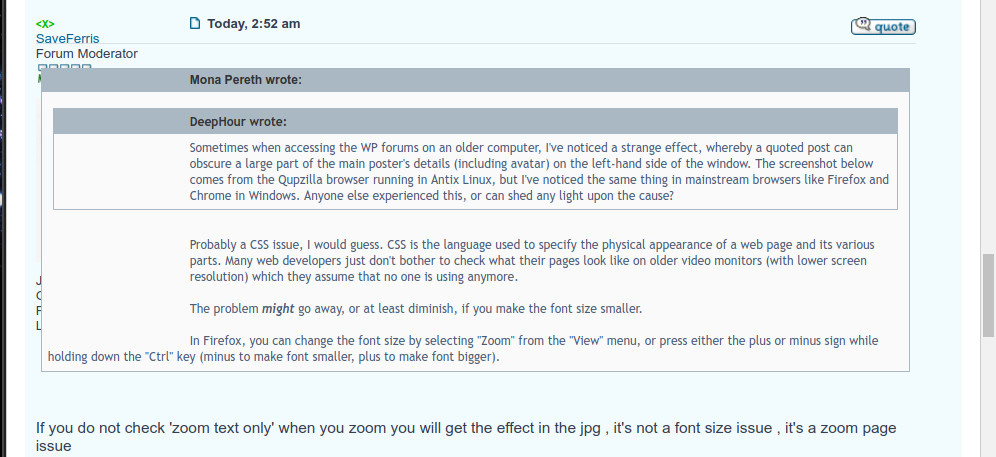
If you do not check 'zoom text only' when you zoom you will get the effect in the jpg , it's not a font size issue , it's a zoom page issue


_________________
R Tape loading error, 0:1

Hypocrisy is the greatest luxury. Raise the double standard


AnneOleson
Veteran
Veteran

User avatar

Joined: 8 May 2016
Age: 69
Gender: Female
Posts: 2,826
Location: Coventry

13 Sep 2019, 10:12 pm

It’s been doing this on my iPad (pro and air versions) and iPod touch for quite a long time. Ive just given up on solving the problem.

Although I’m blind as a bat, I don’t believe l have altered the zoom setting on any of my devices. I generally access WP through Safari, but occasionally Firefox or Opera.


SaveFerris
Veteran
Veteran

User avatar

Joined: 3 Sep 2016
Gender: Male
Posts: 14,762
Location: UK

13 Sep 2019, 10:31 pm

^ I just tried to emulate it on an iphone & ipad air and couldn't recreate it - weird


_________________
R Tape loading error, 0:1

Hypocrisy is the greatest luxury. Raise the double standard


Soliloquist
Velociraptor
Velociraptor

User avatar

Joined: 13 Oct 2011
Age: 58
Gender: Male
Posts: 467

14 Sep 2019, 4:46 am

Qupzilla is no longer being updated. There have been no updates since
March when the team changed the browser name from Qupzilla
to Falkon and started developing it for the KDE project.

As has already been said the CSS code of the forum skin has
problems re-sizing the boxes when there is limited screen space.
The problem will occur on monitors that are set to a low resolution.

On low resolution monitors you will need to zoom the webpage
out so the boxes have the room to display properly.

Or

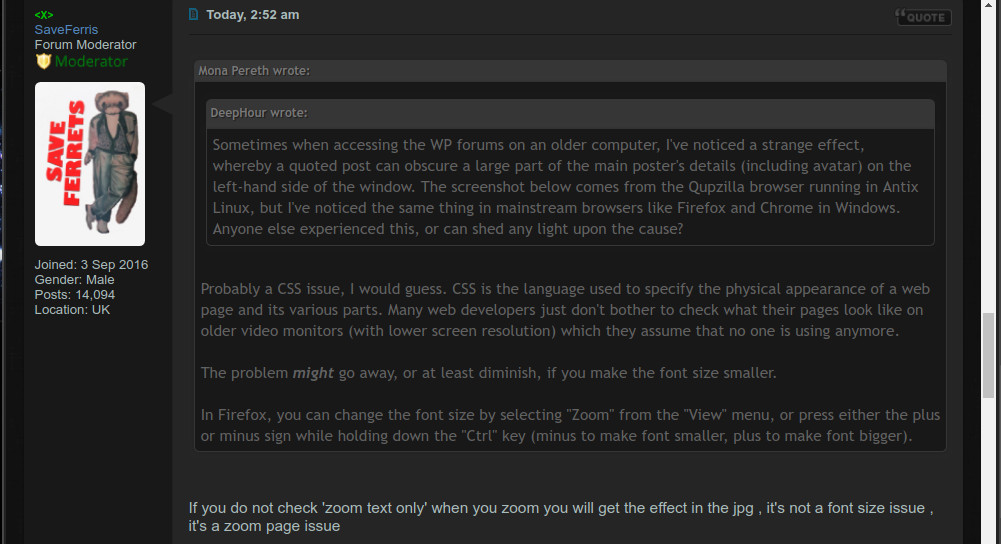
You can use Wrongplanet member SerOrange’s custom theme which
seems to do a better job of displaying the boxes on low resolution monitors.

The images below are being displayed at original zoom on a 1024x720 resolution TFT monitor.

Image

Image

More info about SerOrange’s theme can be found in this thread:
viewtopic.php?t=309631&p=7081610#p7081610

If you decide to use this theme it’s recommended that you use “Stylus”
the open source fork of “Stylish”.


Quote:
Privacy Policy

Unlike other similar extensions, we don't find you all that interesting.
Your questionable browsing history should remain between you and the NSA.
Stylus collects nothing. Full stop.


Stylus for Chrome and Chrome variants:
https://chrome.google.com/webstore/deta ... gmne?hl=en

Stylus for Firefox:
https://addons.mozilla.org/en-GB/firefox/addon/styl-us/


DeepHour
Veteran
Veteran

User avatar

Joined: 1 Jun 2014
Gender: Male
Posts: 94,386
Location: United Kingdom

14 Sep 2019, 11:13 am

Thanks for that really simple and effective solution, Ferris and Soliloquist - I don't think I'd ever have thought of that! :D

I've got Stylus on my main laptop, and will have to have a closer look at it in the future. At the moment I'm using Dark Mode/Night Reader: https://chrome.google.com/webstore/deta ... njjc?hl=en

The screenshot was from a 2002 T23 Thinkpad - the really amazing thing is that a machine of that age can run any internet content at all....


_________________
On a mountain range
I'm Doctor Strange


AnneOleson
Veteran
Veteran

User avatar

Joined: 8 May 2016
Age: 69
Gender: Female
Posts: 2,826
Location: Coventry

14 Sep 2019, 1:31 pm

SaveFerris wrote:
^ I just tried to emulate it on an iphone & ipad air and couldn't recreate it - weird

Your post just above my previous one has the weird formatting. Soliliquists doesn't. Apparently I can’t download any of the extensions with iOS. I’ve learned to live with it. Although something similar happened on Mumsnet and we were able to fix it there. I’ll dig around in my messages on that site and see what we did. (Is it safe to admit that I follow Mumsnet?)


AnneOleson
Veteran
Veteran

User avatar

Joined: 8 May 2016
Age: 69
Gender: Female
Posts: 2,826
Location: Coventry

14 Sep 2019, 1:37 pm

SaveFerris wrote:
^ I just tried to emulate it on an iphone & ipad air and couldn't recreate it - weird

I don’t think I’ve changed any of the resolution settings etc., on my iPad. I don’t use the “night” mode and leave it on the same brightness all the time.

Edit: I hold my iPad in portrait position. If I turn it to landscape I don’t get the “weird” effect!